Field note
Set API Rate Limits Above P95, OWASP, NGINX and Azure for Developers
For developers: API rate limiting using token bucket or sliding window with OWASP tuning. Set limits above P95 and test with NGINX and Azure.
For developers: API rate limiting using token bucket or sliding window with OWASP tuning. Set limits above P95 and test with NGINX and Azure.
API rate limiting caps how many requests a client can make in a given window, returning a 429 Too Many Requests response with a Retry-After or X-RateLimit header once that cap is hit. Production APIs should enforce limits at multiple scopes at once, per IP address, per authenticated identity, and per endpoint, rather than relying on a single global counter.
TL;DR:
- Enforce rate limits across multiple scopes like IP address, user identity, and endpoint to prevent abuse and ensure fairness.
- Use algorithms like token bucket or sliding window for better accuracy and burst handling, avoiding the boundary-spike issues of fixed windows.
- Regularly test and monitor limits under realistic traffic conditions, including intentional overloads, to verify proper 429 responses and client backoff behavior.
- Combine at-edge gateway limits with application-level rules to protect against automation, abuse, and costly resource consumption.
- Always tune and review rate limits based on actual traffic data and usage patterns, adjusting thresholds for different user tiers and scenarios.
Rate limiting sets a hard cap: once a client crosses it, the API rejects further requests until the window resets. Throttling takes a softer approach, delaying or queuing requests to smooth out traffic rather than blocking it outright. Combining both often produces the most resilient behavior, according to a comparison of the two strategies, since throttling absorbs small spikes while rate limiting stops sustained abuse.
Each approach suits different situations:
Rate limiting is a frontline defense against denial-of-service attempts and credential-stuffing campaigns that hammer login or search endpoints with automated requests. Without caps, a handful of misbehaving clients or a single runaway script can degrade performance for everyone else on shared infrastructure.
Rate limiting is a foundational control that has to be tuned and monitored rather than set once and forgotten, per OWASP's guidance on bot management: limits set too aggressively generate false positives that lock out real users, while limits set too loosely let abuse through.
Four algorithms cover most production needs, each with a different tolerance for bursts and a different memory cost.
Sliding-window and token-bucket approaches avoid the boundary-spike issue that fixed-window counters create, according to NGINX's rate-limiting documentation, because there is no single reset instant for clients to exploit. Sliding log gives the highest accuracy but costs the most memory since it stores every request timestamp, while fixed window costs the least but is the least accurate.
For most APIs, token bucket or sliding window is the right default. Avoid naive fixed-window counters unless the traffic is low-stakes and simplicity outweighs precision. In distributed systems, a single centrally updated counter creates latency and contention: NGINX's documentation recommends token bucket with consistent hashing or per-shard counters plus periodic reconciliation instead.
Statistic: RFC 6585 specifies that a server enforcing rate limits commonly responds with status code 429 and may include a Retry-After header telling the client how long to wait, which standardizes how well-behaved clients should react across any algorithm you choose.
Enforcing limits at the edge or API gateway stops abusive traffic before it reaches application servers, while application-level limits let you apply business logic tied to user tiers or specific endpoints. Most production setups use both: a gateway-level ceiling for baseline protection and app-level rules for finer-grained quotas.
NGINX implements rate limiting with leaky-bucket semantics through limit_req_zone and limit_req, and its own module documentation notes that the burst and nodelay parameters need careful tuning to avoid unintended rejections or excessive queuing delays, per the ngx_http_limit_req_module reference. Shared memory zones must be sized correctly or the limiter silently drops tracking data under load.
Azure API Management applies limits through the rate-limit and rate-limit-by-key policies and can expose remaining-calls and total-limit headers so clients know when to back off, according to Microsoft's implementation guidance.
Pro Tip: Test your gateway config with a burst of concurrent requests before shipping it. A misconfigured nodelay flag can silently reject legitimate traffic instead of queuing it.
Load testing with tools that simulate concurrent bursts, not just steady traffic, is the only reliable way to confirm a limiter behaves as designed under real conditions. Run tests that intentionally exceed your caps and confirm the API returns 429 with a usable Retry-After value, then check that your own client code actually respects it.
Rate limiting only works as a security control when it is scoped and tuned correctly. OWASP's cheat sheet is explicit that a login limiter should never key on the combination of IP and username together, because that design lets an attacker rotate through unlimited usernames from a single IP without ever tripping the limit, per the Bot Management and Anti-Automation Cheat Sheet. Use separate per-username and per-IP buckets and require both to stay under threshold.
Pro Tip: Attackers use diagnostic details in error responses to fine-tune evasion, so a generic "too many requests" message is safer than one that names the limit or count remaining.
Start from real traffic data rather than a guessed number: pull median and P95 request rates per client over a representative period, then set the limit above P95 with enough margin to absorb normal spikes without inviting abuse.
Note that if clients connect through shared infrastructure, understanding the difference between residential, mobile, and ISP proxy traffic helps explain why IP-based limits alone sometimes misfire on legitimate users behind carrier-grade NAT.
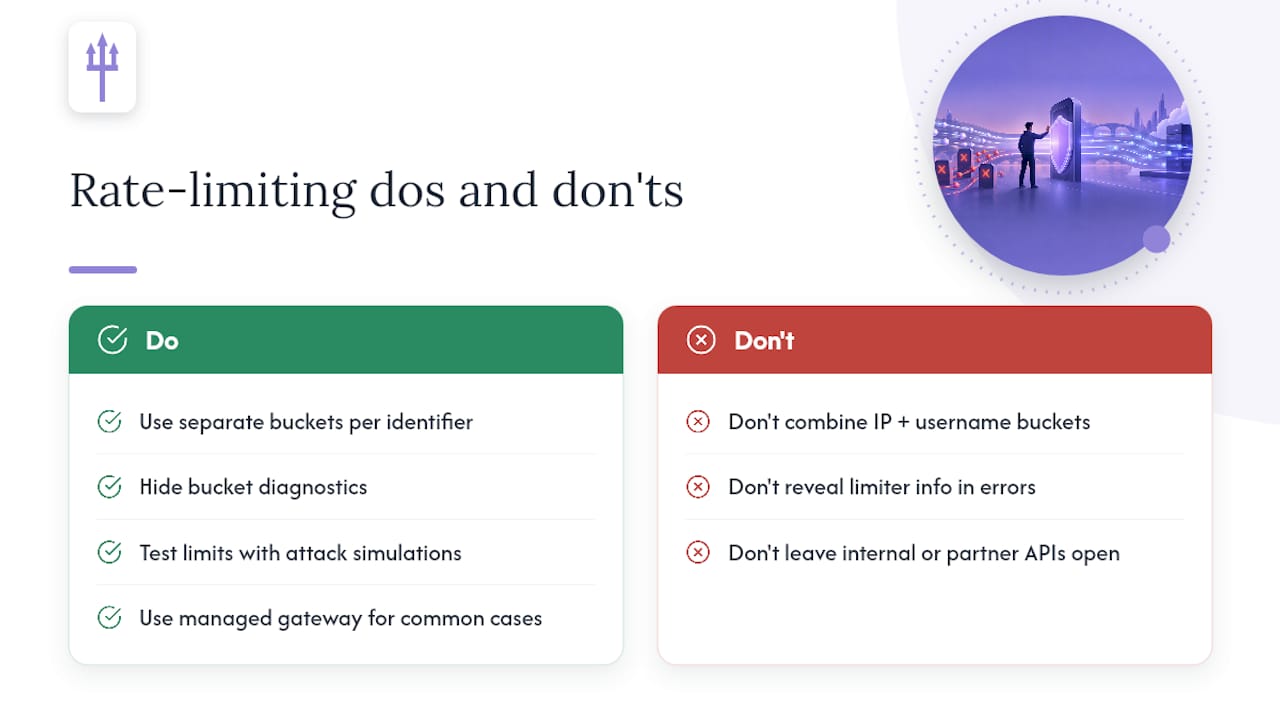
The most common mistake is a single combined bucket for IP and username on login endpoints, which quietly defeats the whole point of the control. The second is leaking bucket diagnostics in error messages, handing attackers a tuning signal for free. The third is limiting public endpoints carefully while leaving internal or partner-facing APIs wide open, assuming trust where none is verified.
Managed gateways like Azure API Management handle the common cases well; custom limiters make sense once you need cross-service coordination a gateway policy cannot express. Either way, the only way to know your limits hold under real attack conditions is to test them like an attacker would.
— caleb
Building rate limits is only half the job. Confirming they hold up against real attack patterns, distributed clients, and edge cases like combined-bucket flaws takes hands-on testing that automated scanners tend to miss. Earthshaker Security's API and endpoint testing combines automation with manual verification, so findings on your rate limiting, authentication, and access controls come with a clear, actionable fix rather than a raw scan output.
This kind of manual verification matters most for distributed rate limiting setups, multi-scope login protection, or anything that needs to hold up under compliance review. Engagements for security testing sometimes include a re-test after fixes are deployed, and clients typically communicate directly with technical staff, not sales teams. Check current engagement pricing to find the right starting point.
Check the response for a Retry-After header, which tells you how long to wait before your next request, a behavior RFC 6585 documents for 429 responses. Back off for that duration, then retry with exponential backoff if the limit persists, and reduce your request frequency or batch calls to stay under the cap going forward.
There is no universal number: the right limit comes from your own baseline traffic, typically set above your P95 request rate with margin for normal bursts. Tiered APIs often give authenticated or paying users higher ceilings than anonymous traffic to balance protection with usability.
Choose an algorithm, usually token bucket or sliding window for accuracy and burst tolerance, then enforce it at the gateway or edge layer using tools like NGINX's limit_req module or a managed service like Azure API Management. Apply limits at multiple scopes, per IP, per authenticated identity, and per endpoint, and return 429 with a Retry-After header when clients exceed them.
Configure a fixed or sliding window counter set to that request count per one-minute interval, using a directive like NGINX's limit_req_zone or a gateway policy like rate-limit-by-key. A sliding window is generally preferable to a fixed window since it avoids letting clients burst past the cap right at the boundary between two windows, as NGINX's documentation explains.