SAST vs DAST: 5-Step CI/CD Runbook for Developers & Security Teams
SAST analyzes source code without running the application; DAST tests an application while it runs. Use SAST early, when developers can fix issues cheaply, and DAST closer to release, when you need to see how the app actually behaves. Run both, in complementary stages, because each one catches what the other misses.
TL;DR:
- Static analysis tools scan source code early in development to catch injection and deserialization issues before deployment, but they tend to produce false positives on complex flows.
- Dynamic testing requires a running application and is more effective at identifying runtime vulnerabilities like misconfigurations and session flaws, though it depends heavily on application crawlability and authentication setup.
- Running SAST at commit time and DAST on staging environments before releases ensures both static and dynamic vulnerabilities are detected, with a focus on verifying runtime behavior and exploiting real-world flaws.
- Effectiveness varies across tools and codebases, so evaluating scanners with your application and supplementing automation with human review significantly improves security findings accuracy.
- Combining these methods within a continuous pipeline, along with ongoing re-testing and triage, is essential for comprehensive security coverage and reducing false alarms.
Table of Contents
What SAST and DAST Are and How Each Works
SAST, or static application security testing, inspects source code, bytecode, or binaries without executing anything. It reads the code the way a very fast, very literal reviewer would, tracing data flows to flag patterns like unsanitized input reaching a database query. Because it needs no running system, SAST plugs into an IDE, a pre-commit hook, or a build step, and it can flag a problem the moment a developer writes it.
DAST, dynamic application security testing, works the opposite way. It sends real requests to a running application, typically in staging or another non-production environment, and watches how the app responds. It has no idea what the code looks like; it only knows what comes back over the wire.
That difference in vantage point shows up in what each one finds:
- SAST commonly flags a SQL query built with string concatenation before it ever runs.
- DAST commonly flags a login form that accepts a session token after logout because the app is live when the test hits it.
- SAST catches insecure deserialization patterns in code; DAST catches a misconfigured server header that only appears in a live response.
According to the TeamCity blog's comparison, SAST can provide feedback at commit time, while DAST requires an executable, running application and is commonly run at deploy or pre-release time.
SAST: Strengths, Typical Findings, and Limitations
SAST's biggest advantage is timing. A developer gets a flag while the code is still open in their editor, which is far cheaper to fix than a bug caught after deployment. It integrates naturally into pull requests, nightly builds, and IDE plugins, so feedback becomes part of the normal coding rhythm rather than a separate security phase.
SAST tends to be strong at surfacing:
- Input validation gaps that could lead to injection.
- SQL injection patterns visible directly in query construction.
- Unsafe deserialization calls and other known-risky function usage.
The limitations are real, though. SAST tools frequently produce false positives because they cannot always tell whether a flagged pattern is actually reachable or exploitable in context. They also struggle with complex control flow across many files or services, and they have no visibility into runtime configuration, network exposure, or how third-party integrations behave in production.
A NIST evaluation of static analysis tools found substantial variability in effectiveness across test cases, weakness classes, and code complexity. Tools performed more reliably on simpler bugs than on complex ones, which is a strong argument for testing any static analyzer against your own codebase before trusting its output.
DAST: Strengths, Typical Findings, and Limitations
DAST earns its place by testing the application the way an outside attacker would: no knowledge of the source, just inputs and observed responses. That perspective catches things SAST structurally cannot see.
DAST typically surfaces:
- Authentication and authorization failures, like a session that outlives a logout.
- Server and application misconfigurations exposed only at runtime.
- Client-side issues such as unsafe cross-origin behavior.
- Some business logic flaws that only appear when a real workflow runs end to end.
The catch is that DAST needs something to test. Coverage depends entirely on how well the scanner can crawl the application and authenticate into it. A scanner that cannot log in will never see anything behind the login wall, and one that cannot follow a multi-step workflow will miss the business logic bugs hiding inside it. Per OWASP's DAST tooling guidance, effectiveness depends on how well the scanner discovers and exercises authentication, stateful flows, and the rest of the application surface. DAST also cannot point at a specific line of code; it can tell you something is wrong, not exactly why.
Pro Tip: Seed your staging environment with realistic test accounts and sample data before running DAST, or the scanner will only ever see the parts of the app that don't require a login.
Comparing SAST and DAST by Decision Criteria
The two methods answer different questions, and lining them up by decision axis makes it clear why teams need both rather than picking one.
| Criteria |
SAST |
DAST |
| Stage in SDLC |
Commit, build, pull request |
Staging, pre-release, deployed test target |
| Visibility |
Source code, bytecode, binaries |
Running application, over the network |
| Typical vulnerability classes |
Injection patterns, unsafe deserialization, insecure function calls |
Auth/session flaws, misconfigurations, client-side issues, some business logic |
| False positive/negative profile |
Higher false positives on complex flows, per NIST SATE |
Misses issues outside crawled or authenticated paths |
| Coverage tradeoffs |
Full code coverage possible, but no runtime context |
Coverage limited by crawl depth and login automation |
| Speed and feedback loop |
Fast, fits inside a commit or PR cycle |
Slower, needs a deployed environment to run against |
A quick checklist turns that table into a decision:
- Define the goal: catching coding mistakes early, or validating how the deployed app behaves.
- Check the constraint: do you have source access and a build pipeline, or a live staging environment with test accounts?
- Pick the test set: SAST for the former, DAST for the latter, and both whenever the release matters.
- Route findings to the right owner: developers for source-level SAST flags, security engineers for runtime DAST findings.
Cost tracks roughly the same pattern. SAST scans are cheap to run often because they need no infrastructure beyond the build system. DAST needs a maintained staging environment and test data, which carries more operational overhead but pays for itself by catching what static analysis structurally cannot.
When to Schedule Scans in CI/CD and How Often to Run Them
Pipeline placement matters more than tool choice. A reasonable default:
- Run SAST in the IDE and on every pull request, so developers see issues before merge.
- Run a fuller SAST scan on nightly builds to catch anything a fast PR-level scan skipped.
- Deploy to staging and run DAST against it before each release, or on a fixed nightly or weekly cadence for actively changing apps.
- Gate merges on high-confidence SAST findings, but treat noisier categories as warnings that get triaged rather than automatic blockers.
- Feed confirmed DAST findings back into SAST rule sets and software composition analysis checks, so the next scan catches the same class of bug at commit time.
The OWASP Developer Guide describes this same pattern at a higher level: security testing distributed across commit, build, and deploy phases rather than concentrated in one late-stage gate.
Pro Tip: Don't fail a build over every SAST warning. Reserve hard gates for confirmed, high-severity classes and route the rest to a triage queue, or developers will start ignoring the scanner entirely.
What NIST and OWASP Say About Tool Effectiveness
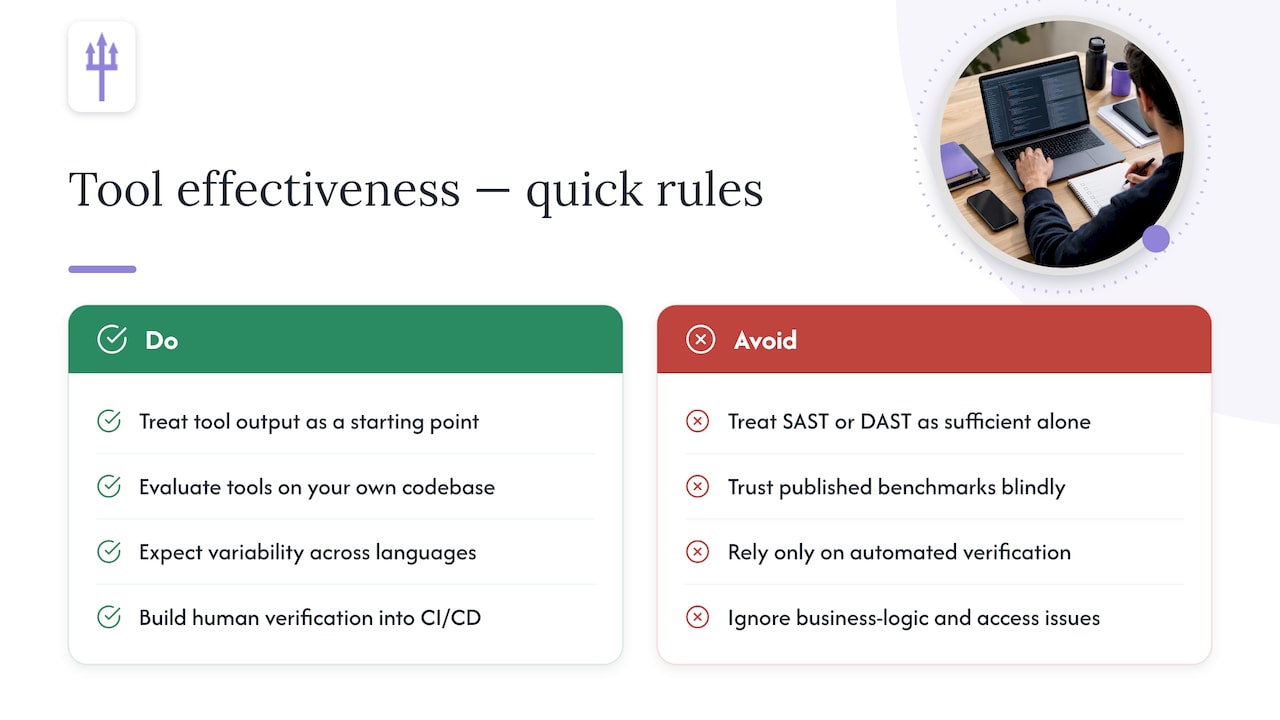
The strongest evidence against treating either method as sufficient on its own comes from the standards bodies themselves, not from marketing claims.
Tools found simpler bugs more reliably than complex ones, and results varied by test case, weakness class, and code complexity.
That is the practical shape of the NIST SATE VI findings, and the report's own recommendation is to evaluate tools against your own codebase rather than trust published benchmarks. A static analyzer that performs well on one team's Java code offers no guarantee of the same performance on another team's Python or Go.
OWASP's security testing guidance makes a related point from the other direction: automated tools, SAST and DAST alike, are useful but cannot achieve comprehensive verification alone. Business logic flaws and many access-control failures require a human tester who understands what the application is supposed to do, not just what it does.
The practical takeaway is straightforward. Treat tool output as a starting point, expect variability across languages and codebases, and build human verification into the process rather than around it.
A Short Runbook for Combining SAST and DAST
A working pipeline looks less like two separate tools and more like a chain that hands findings from one stage to the next.
- Run SAST at commit and build time to catch coding issues while they're cheap to fix.
- Run software composition analysis alongside SAST to catch vulnerable dependencies.
- Run DAST against a staging deployment before release to test runtime behavior and auth flows.
- Route every finding to a human for verification and root-cause triage, prioritized by exploitability rather than raw severity score.
- Convert validated DAST findings into new SAST rules or unit tests so the same bug class gets caught earlier next time.
Pro Tip: Track the percentage of DAST findings that get converted into SAST rules or unit tests. A rising number means your pipeline is actually learning from its own results, not just re-finding the same bugs every release.
Track a focused set of metrics rather than a long dashboard: time to fix for validated issues, the number of findings confirmed as real (versus dismissed as noise), and any measurable changes in production incidents tied to the categories you're testing for.
Why Automation Alone Never Finishes the Job
Automated scanners are fast and cheap to run repeatedly, but speed isn't the same as confidence. A pile of unverified SAST and DAST output just moves the noise problem onto whoever has to triage it. Pairing automation with a human who checks exploitability, then hands back a fix instead of a raw alert, is what actually shortens the distance between finding and fixed. Treat testing as a pipeline you keep tuning, not a report you file once.
— caleb
Getting Hybrid SAST and DAST Coverage Without Building It Yourself
Running SAST and DAST well takes tuned tooling, a maintained staging environment, and someone who can tell a real vulnerability from a false positive at 2 AM before a release. Earthshaker Security handles that combination directly: automated scanning paired with hand-verified findings, so you get a report of confirmed issues and actionable fixes instead of a list you have to triage yourself.
Depending on what your application needs, that can look like:
- A full web application penetration test covering authenticated flows and business logic, not just surface scanning.
- API and endpoint testing for the interfaces a DAST crawler often can't reach on its own.
- An external attack surface review to see what's exposed before an attacker finds it first.
- A configuration and hardening audit for the runtime settings that static analysis never sees.
- A monthly Retainer plan for teams that want ongoing coverage instead of a one-time check.
Every engagement includes a re-test once fixes are in place, and you speak directly with the person who tested your application, not a sales team. Check current pricing and engagement tiers to see what fits your release schedule.
Sources
FAQ
Is SonarQube DAST or SAST?
SonarQube is a static analysis tool, so it falls on the SAST side of the comparison. It inspects source code for quality and security issues without executing the application, which puts it in the same category as other commit-time and build-time scanners.
What is SAST and DAST in SDLC?
In the software development lifecycle, SAST runs early, at commit, pull request, and build stages, checking source code before anything is deployed. DAST runs later, against a deployed staging or pre-release environment, testing the application the way an outside user or attacker would interact with it.
Is DAST still used today?
Yes. DAST remains a standard part of security testing because it catches runtime issues, like authentication flaws and misconfigurations, that static analysis cannot see from source code alone. OWASP's testing guides continue to recommend it as a required check before release, alongside static analysis and human verification.
Is Selenium a DAST tool?
Selenium itself is a browser automation and testing framework, not a dedicated security scanner. It can be adapted to drive traffic toward an application that a DAST tool then analyzes, but on its own it doesn't perform the vulnerability analysis that defines dynamic application security testing.
Recommended