5 signs your security report is noise
How to tell a report that found something from one padded with scanner output: severity inflation, no reproduction steps, and no verified impact.
Nearly 3 Billion malicious sessions were observed targeting internet-facing infrastructure over 162 days, and that scale makes it easy for security reports to drown in activity that does not help engineering or incident response in 2026.
Key Takeaways
- Signal is missing when the report lists issues without proof, impact, or a clear path to remediation.
- Scope drift creates “what we looked at” noise, especially when the report does not match what is exposed in 2026.
- Severity is not decision-ready when it is not tied to exploitation likelihood and real-world constraints.
- Evidence is incomplete when reproductions omit requests, parameters, or observed outcomes.
- Re-testing is treated as optional and fixes are never validated, so the report turns into a history book.
- Use a sample format to sanity-check what “actionable” looks like: our sample report.
- Align reporting to how work actually closes, not to paperwork. Our phase approach is laid out in methodology.
Why “more findings” often means less signal in 2026
In 2026, most organisations have more telemetry than they can process. That changes what a “good security report” looks like.
A report should help you make decisions. It should help you triage. It should help your developers fix specific behaviour. When those outcomes are missing, the report becomes mostly noise, even if the issues are technically real.
Our starting point is simple. A report is signal only when it maps to something you can reproduce, prioritise, and verify. If the artefact does not do that, the volume of issues becomes a distraction.
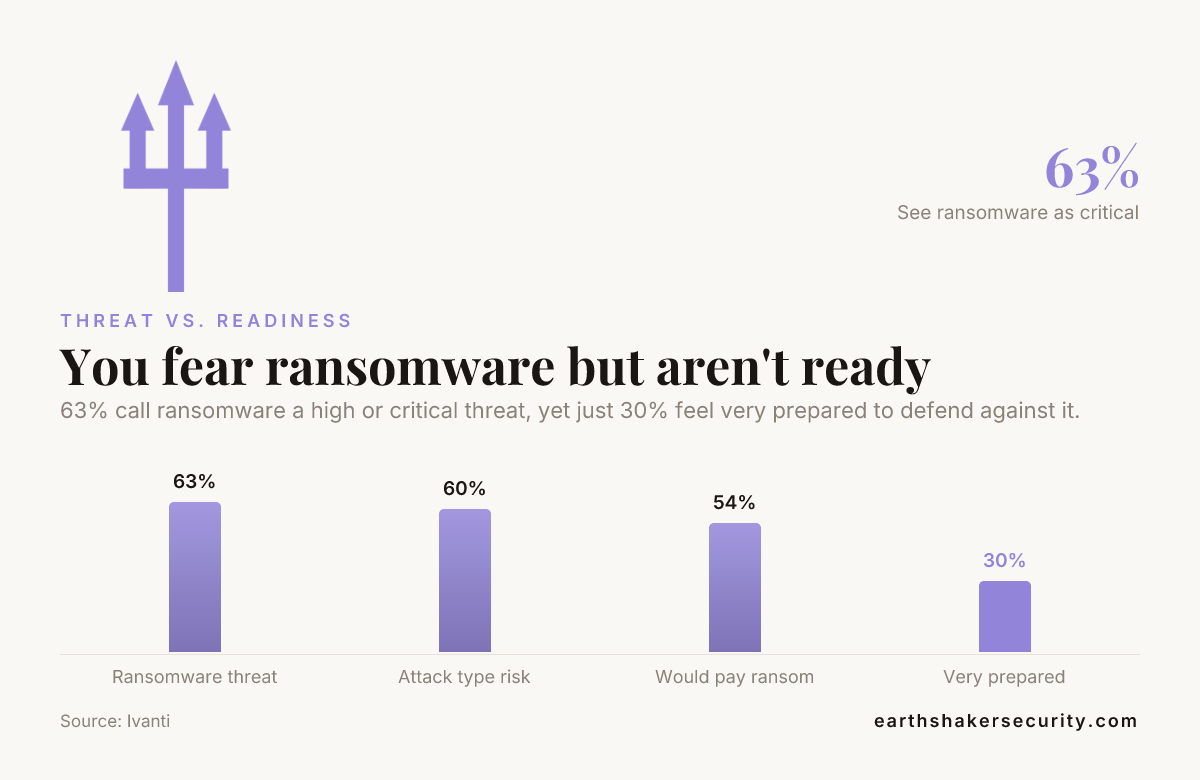
63% call ransomware a high or critical threat, yet just 30% feel very prepared to defend against it.
Sign 1: The report lists vulnerabilities but not exploitation paths
One of the fastest ways to end up with “mostly noise” is to treat a security report as a catalog. Readers want to know how an issue becomes an outcome.
In a useful security report, each finding should answer three concrete questions for 2026 conditions:
- What is the attacker trying to do (credential theft, account takeover, data access, privilege change).
- What input or behaviour triggers it (a parameter, a request sequence, a role mismatch, an admin UI behaviour).
- What happens next (proof-only outcome, impact description, and what the attacker gains).
If the report only says “this looks like X” without showing how X can be used in your application context, it is not decision-ready. It becomes noise for engineering because there is no engineering-grade path to implement a fix.
We see this pattern when reports are generated from templates or scanners without a manual confirmation pass. Our engagements are designed to produce an evidence-backed artefact, not just a list. If you want a reference point, review the structure in our sample report.
Sign 2: Evidence is incomplete, so findings cannot be reproduced
Another critical sign that your current security report is mostly noise is missing evidence. “We observed” statements without reproducible context do not support remediation work.
Engineering teams need enough detail to validate. They also need enough detail to avoid breaking other flows. A noise report forces people into guessing.
Look for evidence completeness indicators. For example:
- Are affected endpoints, parameters, and inputs specified with enough precision to reproduce?
- Is there a clear before-and-after outcome (what changes when the fix is applied)?
- Is the scope defined in a way that lets you map evidence to deployment reality in 2026?
When a report does not provide evidence, it also breaks the feedback loop. Fixes get merged without validation. Over time, the report becomes stale. Then every new scan adds more noise.
Evidence quality is a large part of what makes our format work. In a real engagement report, we include an “Evidence” view and a separate “The fix” view so the same finding supports both investigation and engineering work.
Sign 3: Severity looks consistent, but it is not prioritised for 2026 reality
Severity in a report is often treated as a stable truth. It is not. It is a model, and models fail when they do not match how systems are used.
A security report turns into noise when severity cannot guide triage. This happens when the report:
- Ranks issues without considering whether exploitation is reachable from attacker-controlled inputs in your environment.
- Ignores authentication and role context that exists in 2026 deployments.
- Does not separate “theoretically possible” from “practically exploitable” for your app behaviour.
Did You Know?
63% and 60% respectively rating these attack types as “high” or “critical” risks
Source: Ivanti
This matters because high and critical labels often concentrate attention on certain attack types. If your environment has different exposure paths, the report may repeatedly highlight issues that do not match your actual risk drivers.
In 2026, phishing and the follow-on account effects are still a dominant theme. Reports should still help you decide what to fix first. If your soc 2 report or internal security report highlights phishing but does not provide engineering-grade fixes for reporting and mail handling, it can become noise.
Sign 4: The report confuses scan output with application behaviour
Not all vulnerability classes are equally noisy. Some are easy to detect, and some require context. If your report does not include that context, the findings do not explain what needs to change.
This is where report phishing outlook, outlook report phishing, and other “reporting” behaviours tend to create noise. Many reports include generic guidance about phishing without addressing how your organisation handles suspicious messages, user reporting, and account-impacting outcomes.
Another example is access control. Reports that only check “is there an auth mechanism” do not show the real issue, which is often authorisation between roles and the effect of missing rate limits or unsafe business logic.
Our developer-focused approach explicitly looks at logic, authorisation, and “what actually happens in your code paths”. If you are evaluating whether your report is mostly noise, ask whether it includes:
- Requests and intent, not just a vulnerability name.
- Role-aware behaviour, not just a checklist item.
- Notes about what the attacker can do after initial access.
If the report is just a set of scanner outputs, it often repeats the same categories without proving what is reachable in your deployment.
Sign 5: There is no verified closure, so reports never stop adding noise
A security report should not end at delivery. It needs a closure mechanism. Without verification, fixes are untrusted and the next cycle reopens the same topics.
In 2026, teams already have too much work. Noise reports create more work. They do not reduce it.
When a security report is mostly noise, you usually see these symptoms:
- No re-test or no evidence that the “The fix” actually resolves the finding in the same scope.
- Re-test results are not linked back to the original evidence and exploitation path.
- Follow-up items are vague, so developers cannot prioritise them with confidence.
Our process is built around recon, enumeration, proving, reporting, and re-testing. The goal is not a PDF. The goal is verified outcomes in your environment. The phase approach is described in methodology.
Common “report phishing” and email-related noise patterns
Phishing reporting can generate a surprising amount of noise, especially when a report uses the wrong level of detail.
In a useful report for 2026, “report phishing mail” and “gmail phishing reporting” are not topics on their own. They are part of a workflow. Your report should tie workflow controls to actual outcomes, such as:
- Whether reported messages are handled consistently across inboxes and user roles.
- Whether user reporting triggers safe downstream handling rather than creating more exposure.
- Whether the system actually reduces time-to-response for suspicious messages.
Where reports become mostly noise is when they stay at policy level without showing behaviour in your environment. Another failure mode is when the report focuses on detection only, while the organisation’s actual weakness is the post-detection workflow.
If your internal security report includes phishing categories but does not connect them to what users do when they see a message, it is likely adding noise. Look for evidence in the report that describes what changes for the user and for the mailbox lifecycle.
How to audit your next report before it becomes noise
Before you accept a security report, apply a quick checklist. This is not about looking for more pages. It is about checking whether each finding can drive action.
We recommend you score each finding on these properties:
Property
What “signal” looks like
Reachability
Can someone in scope trigger the behaviour with attacker-controlled input?
Evidence
Are there reproducible requests, parameters, and observed outcomes?
Impact
Does it state what the attacker gains, in terms that map to engineering work?
Fix
Is remediation described in a way your developers can implement and validate?
Verification
Is there a closure loop that re-tests fixes in the agreed scope?
If more than a small portion of the findings fail on evidence or verification, the report is mostly noise. You can also spot report noise when people stop reading individual findings and start debating severity alone.
For a quick artefact reference, we keep the engagement report format visible via our sample report. It shows how “Impact”, “The fix”, and “Evidence” fit around each finding.
What to look for in services that produce usable reporting
Some organisations treat testing and reporting as a one-time event. In 2026, that model increases noise because fixes are rarely verified in the same scope.
When you evaluate providers, look for how they structure the work. We describe it as recon, enumerate, prove, report, and re-test. You can read the phase breakdown in methodology.
Also look at whether the service covers the parts of your app that create real outcomes. For example, if you have web applications, APIs, and endpoints, your security report should not be limited to unauthenticated scanning.
Did You Know?
over 90% of intrusions involved activity across multiple attack surfaces
Source: Palo Alto Networks (Unit 42)
This multi-surface reality is a reason reports become fragmented. If your reporting process only captures one surface, you get many partial findings that do not connect. That is also a reason a soc 2 report can be paperwork-complete but action-poor.
If you want reporting that aligns to how development teams actually fix issues, review services and how each engagement type produces an artefact suitable for security review workflows.
Conclusion: how to turn your security report into signal
These are the five core signs that 5 critical signs your current security report is mostly noise: missing exploitation paths, incomplete evidence, severity that does not support triage in 2026, scan output that does not explain behaviour, and no verified closure.
If you are drowning in findings, the fix is not more scanning. It is better artefacts. Evidence that supports reproduction. Fix guidance that developers can implement. A closure loop that verifies remediation.
Frequently Asked Questions
How do I know if my security report is mostly noise in 2026?
Check whether the findings include reproducible evidence and a clear exploitation path. If severity does not drive engineering triage, or if there is no verification loop after fixes, your security report is likely mostly noise.
What should a SOC 2 report include so it is not just paperwork?
A soc 2 report should help your team close specific remediation items with evidence and verification. If it names control topics without actionable evidence, it can become mostly noise for engineering in 2026.
Why does my report keep listing the same issues every time?
That pattern usually means fixes are not verified in the same scope and evidence loop. Without re-testing and closure, the next engagement repeats categories, and the overall report quality drops into noise.
Does report phishing outlook mean we only need email detection?
No. “report phishing outlook” and related workflows are only useful if the report connects user reporting to safe downstream handling. In 2026, a noise report often stops at detection advice and misses workflow outcomes.
Are scan results enough, or do we need manual proof-only confirmation?
Scan output alone often misses context like role-based authorisation and reachable behaviour. A useful security report should prove findings in your application context and provide evidence your team can reproduce.
How do we reduce alert fatigue without missing real risk?
Reduce noise by prioritising findings based on reachability, evidence quality, and verification status. Reports should focus on what an attacker can realistically trigger, then document fixes that can be validated.
Where can I see an example security report format?
Review the structure shown in our sample report. It shows how findings include impact, evidence, and remediation so the artefact stays usable instead of becoming mostly noise.
Call to action: If you want to sanity-check how your findings should be evidenced and verified, review our sample report and compare it to your current security report.
Want this run against your app?
Book a scanComments
No comments yet. Questions, corrections and war stories all welcome.