File Upload Testing for QA and Security Teams: 4 Checks to Automate
Build file upload tests for QA, pentesting, and CI. Cover spoofed types, archive attacks, server validation, storage, and cleanup with OWASP guidance.
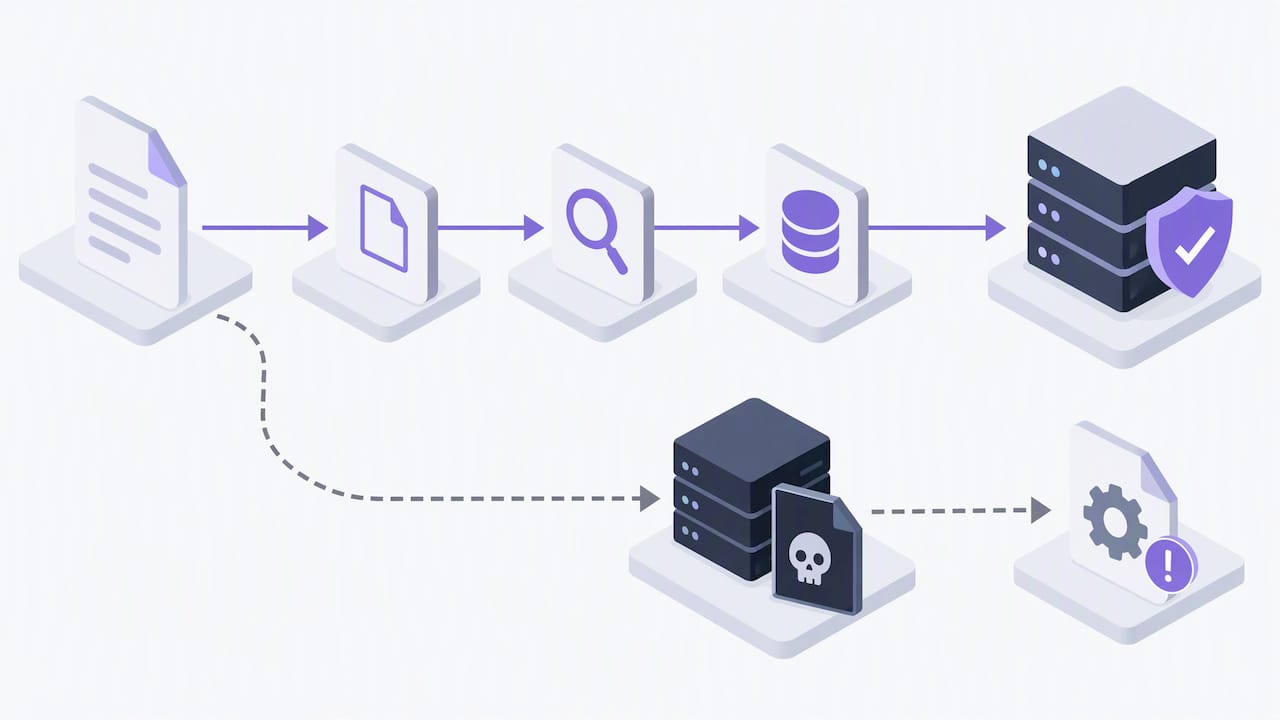
A successful file upload test proves the feature works end-to-end while blocking abuse: valid files move through upload, processing, and retrieval without errors, and malicious ones get rejected before they ever touch a server's file system. Start with three checks: extension allowlisting paired with file-signature validation, server-side renaming with storage isolation, and antivirus or content disarm and reconstruction scanning. From there, move into deeper automated and manual test cases.
TL;DR:
- Enforce archive size limits after decompression, and test nested archives and path traversal to verify extraction cannot escape its intended directory.
- Put multiple uploads, boundary size cases, duplicate filenames, and private file retrieval checks in automated regression; reserve complex archive payloads for manual penetration tests.
- Pair browser automation with multipart API tests, check both PUT and POST endpoints, and run slow antivirus scans asynchronously outside continuous integration.
- Test processing, retrieval, authorization, URL expiration, caching, and cleanup, since a successful upload can still expose private files or leave abandoned data behind.
Table of Contents
- Quick testing checklist for engineers and QA
- Common vulnerabilities and their impact
- Practical test cases: QA, SDET, and pentester checklists
- Automation techniques and tooling for reliable file-upload tests
- Validation and hardening best practices for the server side
- Lifecycle and storage checks from upload to retrieval and cleanup
- Common mistakes we see in file upload security reviews
- How we can help secure your upload functionality
- FAQ
- Sources
Quick testing checklist for engineers and QA
Before writing a single test case, confirm these controls exist. This list works as a starting test plan or a ticket template for a sprint.
- Allowlist accepted extensions and verify file signatures (magic bytes); never trust the Content-Type header alone.
- Sanitize and rename every uploaded filename, cap length and allowed characters, and store files outside the web root.
- Enforce size limits calculated after decompression, require authentication and authorization checks, and throttle repeated requests.
- Scan uploads with antivirus or content disarm and reconstruction tools, log every upload, and wire automation hooks into your CI pipeline.
Pro Tip: Run the checklist against a deliberately malformed file (wrong extension, spoofed MIME type, oversized payload) before testing happy-path uploads; it surfaces missing validation faster than testing valid files first.
Common vulnerabilities and their impact
Unrestricted File Upload happens when an application accepts a file without properly checking its type, content, or destination, letting an attacker drop a web shell onto the server and gain a persistent backdoor. The OWASP community page on Unrestricted File Upload documents these attack vectors in detail, including filename metadata abuse and the risk of accidentally overwriting configuration files during testing.
Client-side content attacks are just as common. An SVG file can carry embedded JavaScript that executes when rendered in a browser, turning an "image upload" into a stored cross-site scripting vector. XML-based formats can trigger XML External Entity (XXE) attacks if a parser resolves external entities. Image and document uploads can also leak EXIF or metadata that exposes device information or GPS coordinates without the uploader realizing it.
Archive uploads add another layer of risk:
- Zip-slip attacks use crafted paths inside an archive to write files outside the intended extraction directory.
- Archive bombs (small files that decompress into gigabytes of data) can exhaust disk space or memory and cause denial of service.
- Extension and content-type spoofing let an attacker rename a malicious script with an image extension to slip past weak filters.
A single unrestricted upload vulnerability can lead to full site takeover, data exfiltration, service outages, or regulatory exposure, which is why the OWASP File Upload Cheat Sheet treats upload validation as a defense-in-depth problem rather than a single check.
Practical test cases: QA, SDET, and pentester checklists
Treat these as a runnable sequence: functional tests first, then adversarial payloads, then access control. The OWASP Web Security Testing Guide includes a dedicated section on testing unexpected file type uploads that maps well onto this flow.
- Upload multiple files in one request, files with non-ASCII or extremely long filenames, and files at the exact minimum and maximum allowed size.
- Attempt concurrent uploads from the same session to check for race conditions in filename generation or quota enforcement.
- Upload a web shell disguised with an image extension and a spoofed MIME type to confirm signature checks catch it, not just the extension.
- Upload an SVG containing an inline script tag and a PDF with embedded JavaScript to test content sanitization on render.
- Submit a malformed or truncated archive to confirm the parser fails safely instead of crashing the service.
- Build a nested zip (a zip inside a zip inside a zip) and a zip-slip payload with
../path traversal in file names to confirm extraction is contained. - Send a small archive engineered to decompress into an oversized payload to confirm size limits apply after decompression, not before.
- Attempt an upload without authentication, then with a lower-privilege account targeting another user's upload endpoint.
- Try to overwrite an existing file by submitting a duplicate filename and confirm the system renames or rejects it instead.
- Request a public retrieval URL for a private upload directly to confirm the access control holds outside the normal UI flow.
Run items 1, 2, 9, and 10 in automated regression suites; save the archive and payload-based tests for manual pentest cycles where a human can verify behavior beyond a pass/fail assertion.
Automation techniques and tooling for reliable file-upload tests
Browser-level automation removes the flakiness of simulating drag-and-drop or native file pickers. In Playwright, locator.setInputFiles() sets files on an input element directly, and page.on('filechooser') lets a test intercept and respond to a file chooser dialog deterministically, without relying on OS-level dialogs.
Playwright also lets you inject files as in-memory buffers, specifying a name, a MIME type, and raw content, which makes it simple to simulate a spoofed header or a malformed file without keeping dozens of fixture files on disk.
- Pair browser tests with API-level multipart form-data tests to confirm server behavior independent of the UI.
- Test both PUT and POST upload endpoints if your application supports them, since validation logic sometimes diverges between the two.
- Simulate chunked or streaming uploads for large-file flows to confirm partial-upload handling and resume logic don't bypass validation.
- Run heavy antivirus or content disarm and reconstruction scans outside the CI runner itself, triggered asynchronously, so slow scans don't block every pipeline run.
Pro Tip: Keep a small library of "known bad" fixture files (spoofed image, zip-slip archive, oversized payload) in your test repo so every pipeline run exercises the same adversarial cases, not just happy-path uploads.
Validation and hardening best practices for the server side
The OWASP File Upload Cheat Sheet lays out a layered defense model, and each layer needs its own verification step during testing, not just a code review.
- Allowlist by extension and confirm it against the file's magic bytes or signature, and run the extension check only after the filename has been fully decoded.
- Rename every uploaded file to a generated identifier such as a UUID, restrict allowed characters in any retained metadata, and set appropriate file size limits taking decompression into account.
- Store uploaded files outside the web root or on an isolated host, disable per-directory configuration overrides, and set restrictive permissions on the storage location to prevent execution.
- Run risky formats through antivirus or content disarm and reconstruction tooling, and never assume a library's default configuration is secure out of the box.
That last point matters more than it sounds. A 2024 academic study of file upload libraries in Node.js found that many popular libraries and real-world applications shipped with missing checks or unsafe default configurations, leading to multiple disclosed vulnerabilities. The lesson for testers: verify a library's actual behavior against your test cases instead of trusting its documentation or default settings.
Lifecycle and storage checks from upload to retrieval and cleanup
A file upload test plan that stops at the upload endpoint misses half the attack surface. The OWASP Cheat Sheet frames uploads as a full lifecycle, from selection through transfer, processing, storage, retrieval, and cleanup, and each stage needs its own checks.
- Verify processing pipelines, such as image resizing, text extraction, or document indexing, fail gracefully on malformed input instead of crashing or executing embedded content.
- Test retrieval handlers for correct
Content-Dispositionand MIME type headers, and confirm served files never carry execute permissions on the host. - Validate authorization on private assets, confirm signed URLs actually expire, and check that caching layers don't serve a private file to an unauthenticated request.
- Confirm failed or abandoned uploads get cleaned up, cached copies don't persist indefinitely, and suspicious upload patterns trigger logging or alerts.
Common mistakes we see in file upload security reviews
The recurring issues we find during web application testing rarely involve exotic attacks. Most come from misconfigured upload libraries left on default settings, missing size checks that only apply before decompression instead of after, and filename handling that trusts user input further than it should.
Automated scanners flag many of these patterns quickly, but distinguishing a real unrestricted upload path from a false positive takes manual verification: confirming a payload actually executes, a path traversal actually writes outside the intended directory, or a privilege check actually fails under the right conditions. Combining fast automated coverage with hands-on verification is what turns a raw finding into a fix a development team can act on with confidence.
— caleb
How we can help secure your upload functionality
If your application accepts files from users, a web application penetration test gives you a hand-verified assessment of upload validation, storage isolation, and access control, alongside the other attack surfaces a scanner alone would miss. For applications built around APIs, our API and endpoint testing covers multipart upload endpoints directly, and an external attack surface review checks whether upload paths are exposed where they shouldn't be.

Engagements typically include a report written for both engineers and non-technical stakeholders, remediation steps, and a re-test once fixes ship to confirm closure.
- Engagement tiers start at Starter with a one-off fee, with a Retainer plan available monthly.
- Custom-scoped engagements are charged by day for larger assessments.
Check current pricing and engagement options or review the full service list to find the right starting point for your upload functionality and broader application security.
FAQ
Is file upload safe?
File upload functionality is only as safe as the validation behind it; an upload feature with extension allowlisting, signature checks, and storage isolation is far safer than one relying on client-side checks alone. Following the layered approach in the OWASP File Upload Cheat Sheet significantly reduces the risk of common attacks like web shells or stored script injection.
How can I test my file upload speed?
Upload speed testing typically measures time-to-completion across varying file sizes and network conditions, often automated with scripts that log start and end timestamps around the transfer. For browser-based flows, tools like Playwright can trigger uploads programmatically and capture timing data without manual interaction.
How do I check whether my uploads are secure?
Start with the quick checklist: confirm extension allowlisting with signature validation, server-side renaming, storage outside the web root, and antivirus or content disarm scanning. Then run adversarial test cases, like spoofed file types and archive-based payloads, to confirm those controls actually trigger under attack conditions.
How should I handle file uploads on the server side?
Handle uploads by validating the file type through its signature rather than its extension or declared Content-Type, renaming the file before storage, and keeping it outside any directory the web server can execute. Size limits should be enforced after decompression for archives, and risky formats should pass through antivirus or content disarm and reconstruction tools before being made available to other users.
Sources
- OWASP File Upload Cheat Sheet
- Playwright docs — Input and file uploads
- (In)Security of File Uploads in Node.js — WWW '24
- Unrestricted File Upload — OWASP community
Recommended
- Control verification checklist for web apps: pre-prod vs production-like testing, evidence, and human-verified findings (2026)
- 30/60/90 Secure SDLC Practices Playbook for Engineering Teams
- Methodology First OWASP Web Application Penetration Testing for Teams
- SAST vs DAST: 5-Step CI/CD Runbook for Developers & Security Teams
Want this run against your app?
Book a scanComments
No comments yet. Questions, corrections and war stories all welcome.